

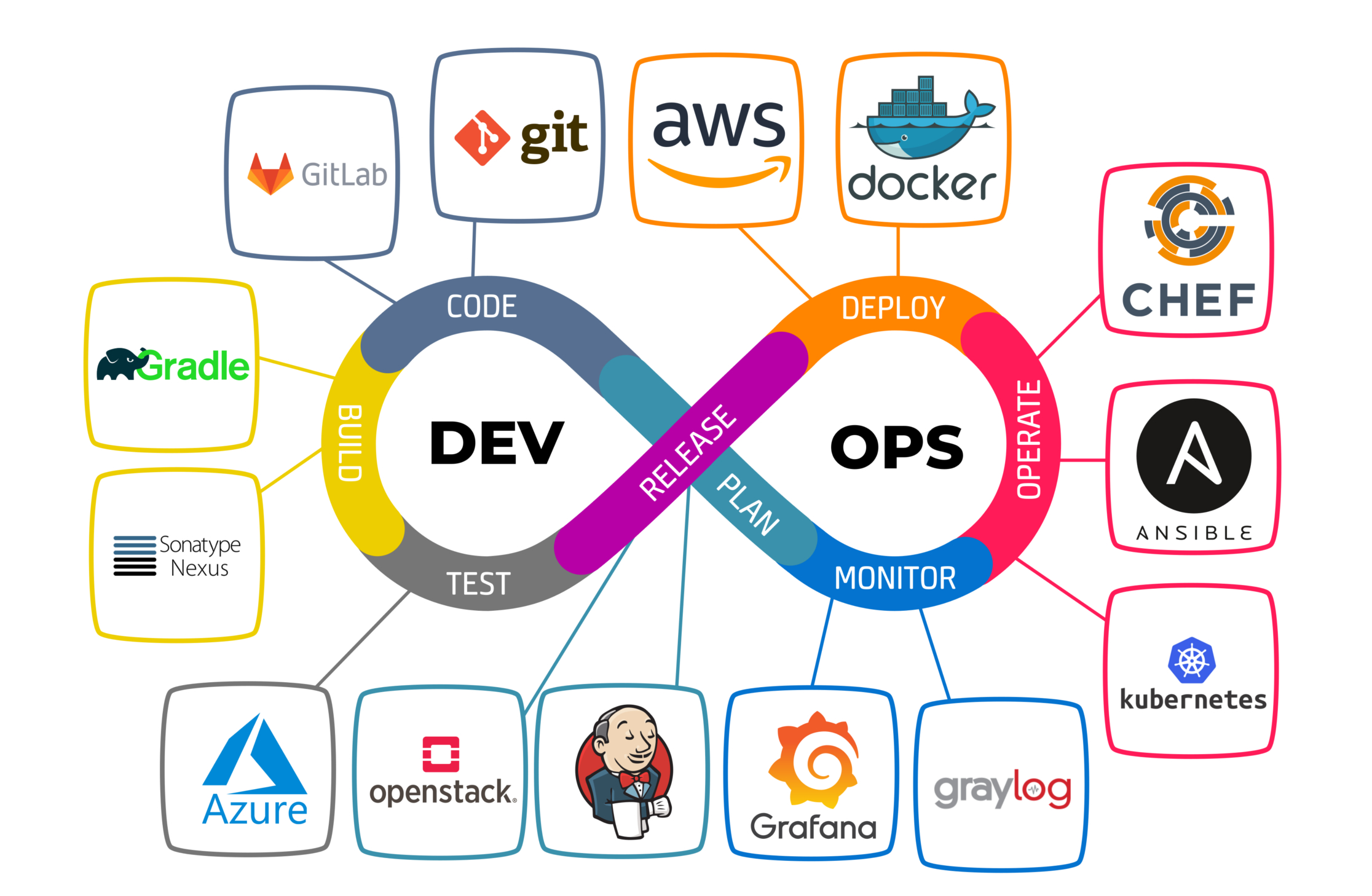
- Chuyện là một anh IT nọ xuôi theo dòng đời, tập tành “học” Linux vào khoảng năm 2 đại học. Có vẻ vì chán ngấy với sự đóng kín của Windows, anh cảm thấy tự do hơn và quan trọng là “múa lửa” hơn, ngầu lòi trong mắt thiên hạ. Bắt đầu tải ISO Ubuntu, cài vào, cứ next thôi chứ chả hiểu và bùm :) tôi đã lạc vào thế giới của Linux được gần 2 năm.
# Commit 81c0e62committed on May 31, 2024- Đây là repo lưu trữ hành trình này, vì nhiều thứ cần nhớ quá :) note vào có gì copy cho tiện, cũng đủ đủ để cài mới một máy rồi: https://github.com/lcaohoanq/linux
- Xem mãi các bài viết “Top CLI Tools Useful for Linux User”, “Ubuntu Vs Debian, which is better?”… cũng chán mình bắt đầu cài những tool mình hay sử dụng, thay thế Windows. Mình thấy ủa vậy thì khác cái chóa gì đâu? Khi chuyển OS qua đây rồi cũng cài lại những app cũ, terminal thì không biết xài :) thứ hay ho nhất trên Linux.
Stack
- Ngôn ngữ: đa số là Scripting Language (Shell Script, Python, Go, …)
- Hệ điều hành
- Linux: mình dùng lâu nhất là Debian 12 Bullseye, hiện giờ đang xài Debian 13 Trixe chưa tới một tháng
- MacOS:
Giới thiệu
Devops là gì?
CI - Continous Integration
CD - Continous Delivery
Setup công cụ
Virtualization
Trước khi có Virtualization
- Chạy app cần server
- Server vật lí
- 1 service - 1 server (isolation: độc lập)
- Luôn luôn overprovisioned
- Tài nguyên server chưa được tận dụng tối đa
- CapEx (Capital Expenditure): Chi phí vốn và OpEx (Operational Expenditure): Chi phí hoạt động cực lớn
VMware
- 1 máy tính chạy được nhiều OS
- Lấy phân vùng của máy host làm tài nguyên cho máy ảo
- Máy ảo chạy độc lập trên các môi trường độc lập
- Mỗi máy áo đều cần một OS
- Phổ biến nhất là Server Virtualization
Các thuật ngữ
- Host OS
- Guest OS
- VM
- Snapshot: backup VM
- Hypervisor: tool để tạo VM, 2 loại
- Type 1:
- Bare Metal
- Chạy như là một Base OS
- Production
- Ex: VMware esxi, Xen Hypervisor, Hyper-V (Microsoft)
- Type 2:
- Run a software
- Learn & Test
- Ex: Oracle VirutalBox, VMware Server
- Type 1:
If you want to Automate something, make sure you know how to do it Manually.
-
Tạo máy ảo Manual
- Oracle VM Virtualbox (Hypervisor)
- ISO file (CentOS & Ubuntu)
- Login tool (Git Bash & Putty)
-
Tạo máy ảo Automated
- Oracle VM Virtualbox (Hypervisor)
- Vagrant (Vagrantfile)
- commands
- vagrant up
- vagrant ssh
- vagrant halt/destroy
- vagrant global-status
-
Tạo Vagrantfile (tìm các bản phân phối linux ở đây: https://portal.cloud.hashicorp.com/vagrant/discover/eurolinux-vagrant/centos-stream-9)
❯ vagrant init eurolinux-vagrant/centos-stream-9 --box-version 9.0.48- Lỗi xung đột kvm với hypervisor virtualbox
❯ vagrant upBringing machine 'default' up with 'virtualbox' provider...==> default: Box 'eurolinux-vagrant/centos-stream-9' could not be found. Attempting to find and install... default: Box Provider: virtualbox default: Box Version: 9.0.48==> default: Loading metadata for box 'eurolinux-vagrant/centos-stream-9' default: URL: https://vagrantcloud.com/api/v2/vagrant/eurolinux-vagrant/centos-stream-9==> default: Adding box 'eurolinux-vagrant/centos-stream-9' (v9.0.48) for provider: virtualbox (amd64) default: Downloading: https://vagrantcloud.com/eurolinux-vagrant/boxes/centos-stream-9/versions/9.0.48/providers/virtualbox/amd64/vagrant.box==> default: Successfully added box 'eurolinux-vagrant/centos-stream-9' (v9.0.48) for 'virtualbox (amd64)'!==> default: Importing base box 'eurolinux-vagrant/centos-stream-9'...==> default: Matching MAC address for NAT networking...==> default: Checking if box 'eurolinux-vagrant/centos-stream-9' version '9.0.48' is up to date...==> default: Setting the name of the VM: centos_default_1766133488873_29698==> default: Clearing any previously set network interfaces...==> default: Preparing network interfaces based on configuration... default: Adapter 1: nat==> default: Forwarding ports... default: 22 (guest) => 2222 (host) (adapter 1)==> default: Booting VM...There was an error while executing `VBoxManage`, a CLI used by Vagrantfor controlling VirtualBox. The command and stderr is shown below.
Command: ["startvm", "d94d141a-1545-4135-aeb5-2a24df8d1eb6", "--type", "headless"]
Stderr: VBoxManage: error: VT-x is being used by another hypervisor (VERR_VMX_IN_VMX_ROOT_MODE).VBoxManage: error: VirtualBox can't operate in VMX root mode. Please disable the KVM kernel extension, recompile your kernel and reboot (VERR_VMX_IN_VMX_ROOT_MODE)VBoxManage: error: Details: code NS_ERROR_FAILURE (0x80004005), component ConsoleWrap, interface IConsole
❯ vagrant box listeurolinux-vagrant/centos-stream-9 (virtualbox, 9.0.48, (amd64))❯ vagrant statusCurrent machine states:
default poweroff (virtualbox)
The VM is powered off. To restart the VM, simply run `vagrant up`Linux
- Xem thêm ở đây, mình có viết bên này nhiều hơn vì Linux là một phạm trù rất rộng và sâu, mình tốn hơn một năm sử dụng để làm quen :) và Linux thành daily choice của mình
- https://blog.lcaohoanq.works/posts/linux/linux/
Networking
- Components
- OSI Model
- Classification
- Devices
- Home Network
- IP Addresses
- Protocols
- DNS & DHCP
- Network Commands
What is Computer Network?
- Communication between two or more network Interfaces
Components of Computer Network
- Two ore more computers/Devices
- Cables as links between the computers
- A network interfacing card (NIC) on each
- Computer
- Switches
- Routers
- Software call;ed operating system (OS)
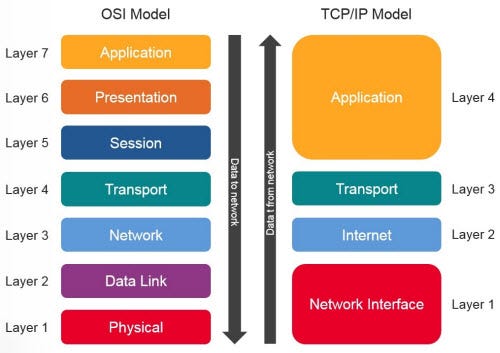
OSI Model
- Có quá nhiều thiết bị kết nối với nhau qua mạng, thì ta cần một chuẩn chung để có thể giao tiếp được với nhau
- ISO (International Organization of Standardization) phát triển chuẩn chung này
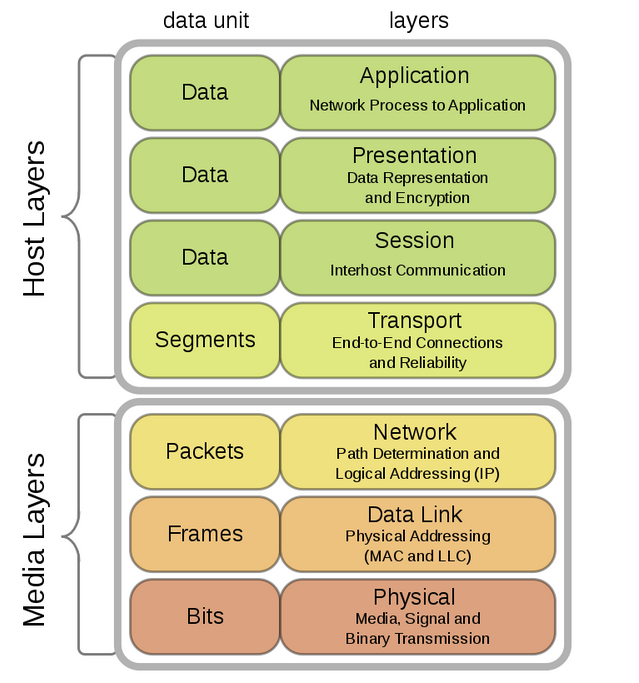
- OSI (Open System Interconnection)
- Mô hình ISO-OSI (1984) là kiến trúc 7 layer
-
- Physical: dây mạng, truyền tín hiệu bit
-
- Data link: bit -> frame (switch)
-
- Network: vận chuyển package từ source -> destination (router)
-
- Transport: cung cấp vận chuyển message và phục hồi error một cách tin cậy
-
- Session: thiết lập, quản lí các session
-
- Presentation: translate, encrypt, compress data
-
- Application: allow access to network resources
-
- Mô hình ISO-OSI (1984) là kiến trúc 7 layer
- Các thành phần cơ bản của một layer
- services: một service, hay các hành động mà layer này cung cấp cho layer cao hơn
- protocols: tập hợp các rules mà layer dùng để trao đổi thông tin
- interfaces: giao tiếp giữa các layer
- Sending - Receiving Letters

Classification of network By Geography
- LAN (Local area Network)
- WAN (Wide Area Network)
- MAN (Metropolitan Area Network)
- CAN (Campus Area Network)
- PAN (Personal Area Network)
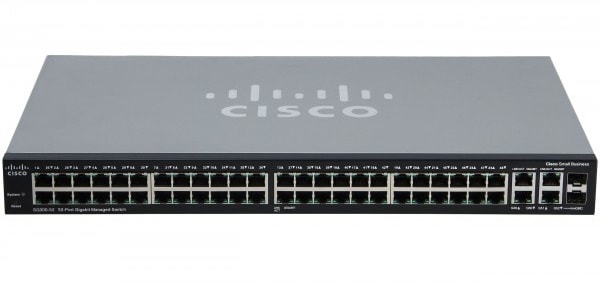
Switches
- Connect nhiều thiết bị lại với nhau
Routers
- Connect các network lại với nhau
- Nội bộ công ty A xài switch A, nội bộ công ty B xài switch B -> 2 công ty muốn kết nối với nhau -> Dùng Router
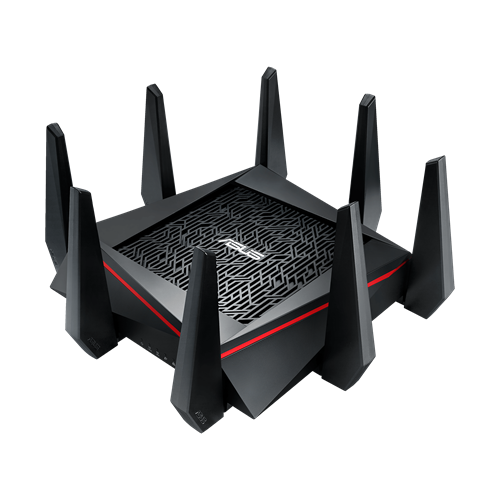
- Router nhà bạn là thiết bị kết nối mạng LAN ra mạng WAN (Internet), nó kèm theo switch nữa, nên các thiết bị có thể kết nối với nhau
Home Network
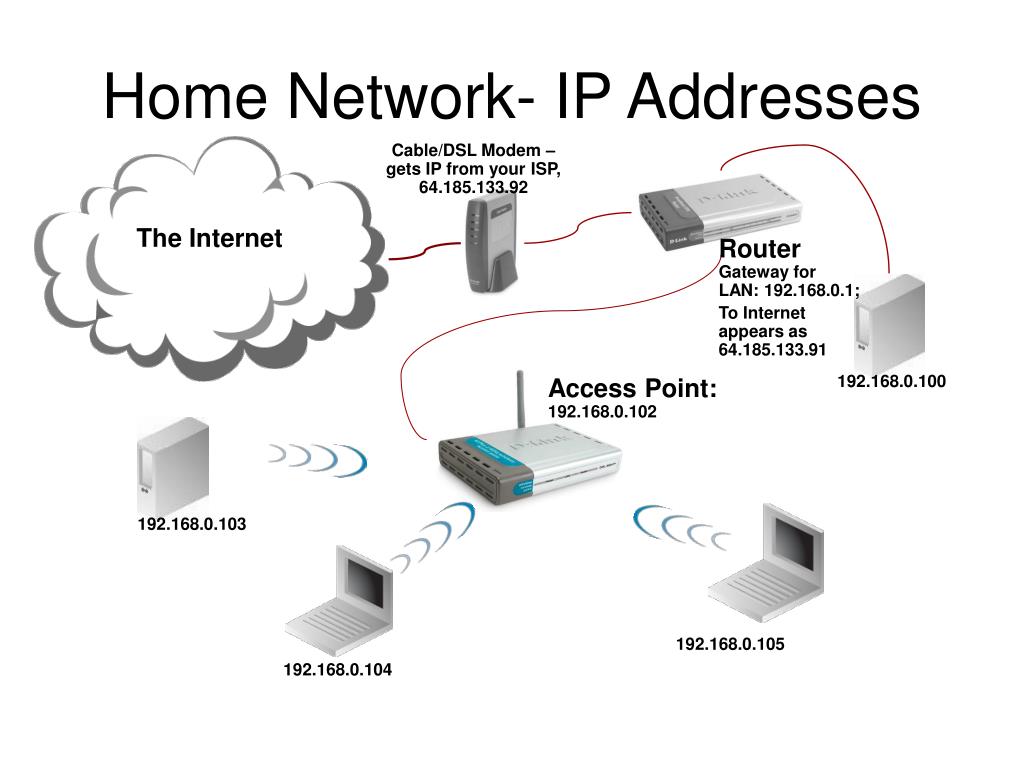
- Internet -> cáp -> Modem -> cáp -> Router -> Switch (ở ngoài router)
- Các thiết bị kết nối với nhau qua Switch rồi qua Router -> ra ngoài
- Mỗi thiết bị đều có một địa chỉ ip
Corporate Network
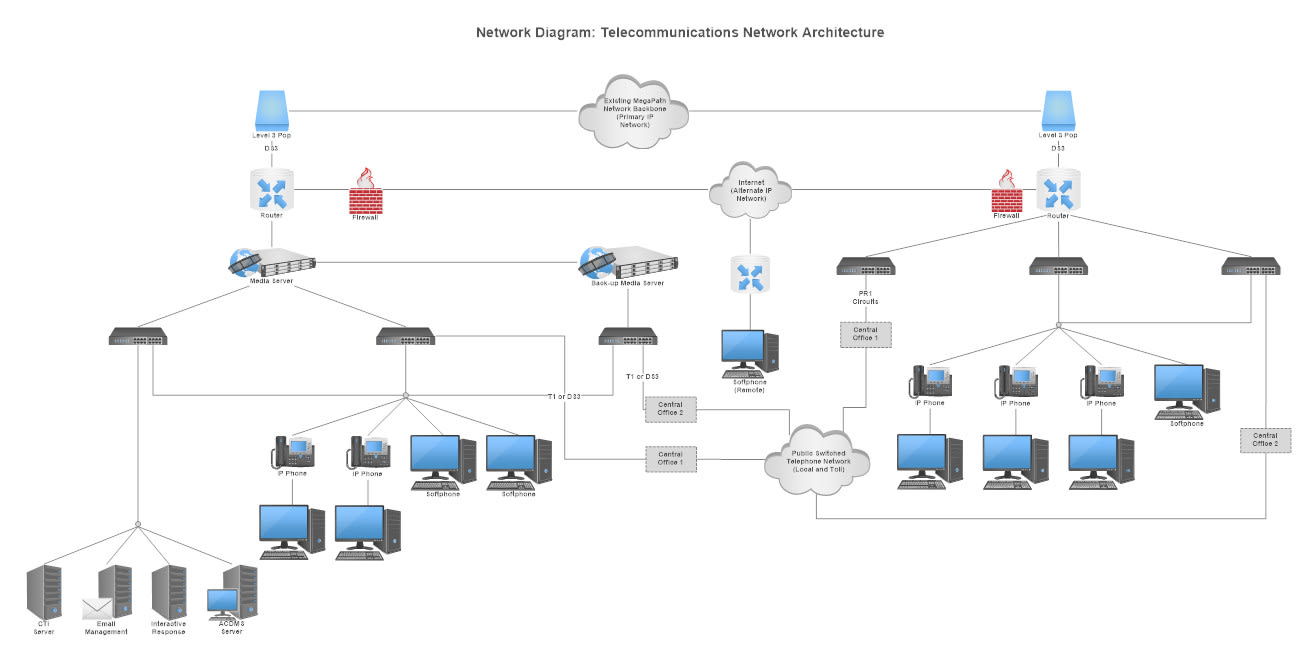
- Many many switch, router
- Multiple internet service providers
- High availability purpose
Data Center Network
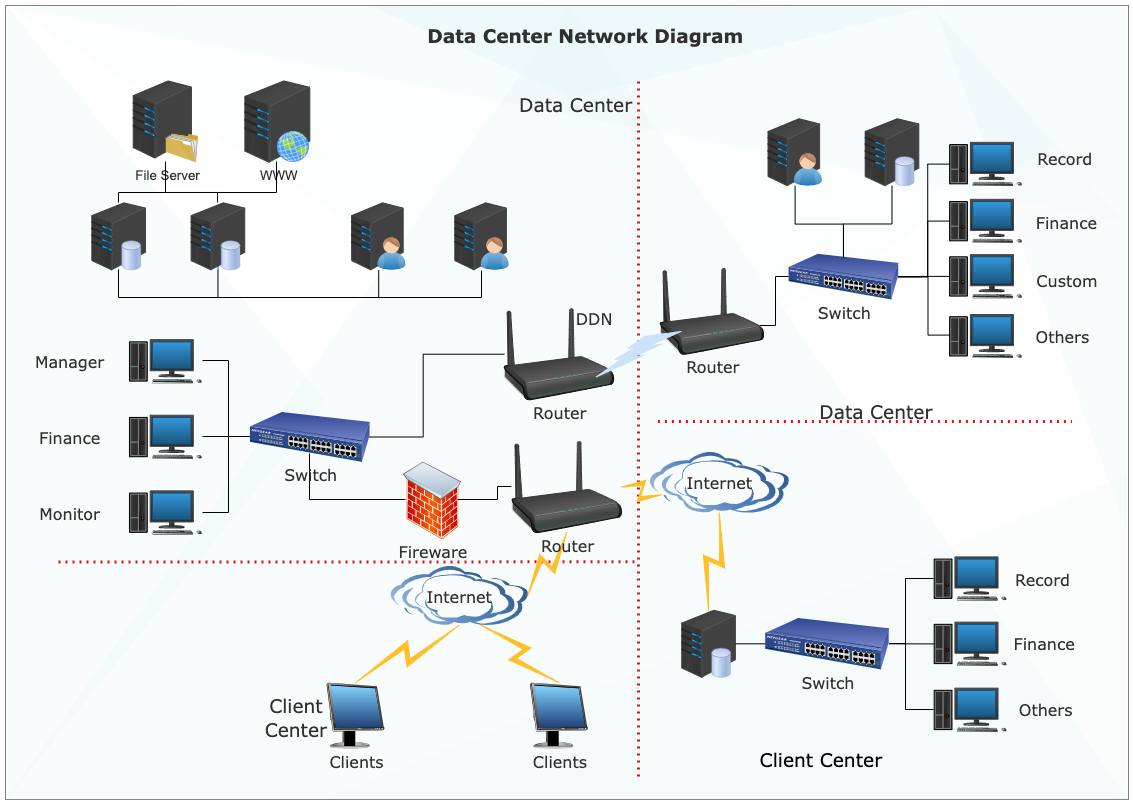
IPv4
- Range
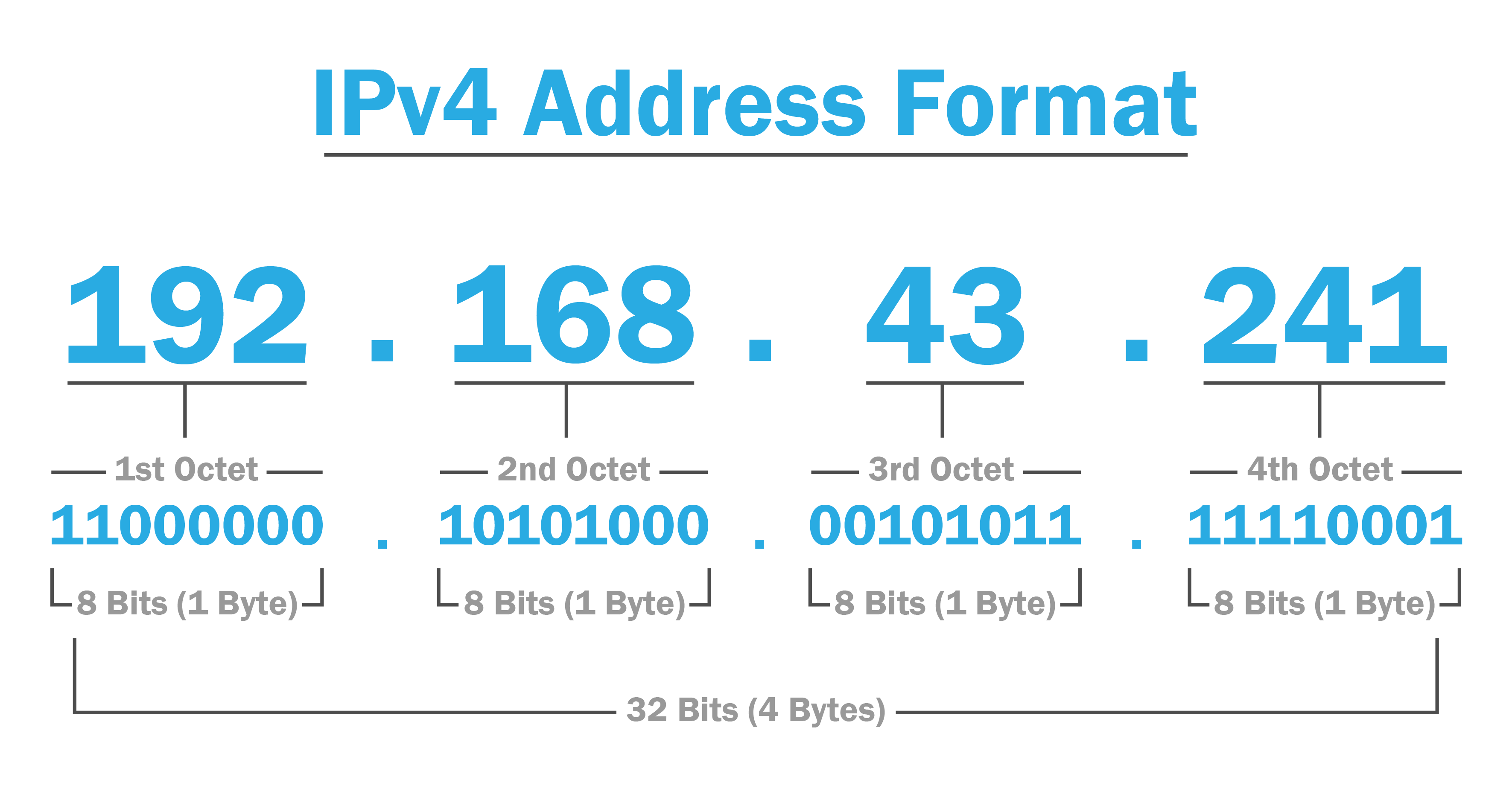
- 0.0.0.0 - 255.255.255.255
Tại sao lại có range như này, hãy nhớ đây là số binary, đây là 2 giá trị đầu tiên và cuối cùng 0.0.0.0 -> 00000000.00000000.00000000.00000000 255.255.255.255 -> 11111111.11111111.11111111.11111111
Public IP và Private IP
-
Public IP => Internet
- 54.86.23.90
-
Private IP => Local network
- 192.168.1.10
- Ranges
- Class A: 10.0.0.0 - 10.255.255.255
- Class B: 172.16.0.0 - 173.31.255.255
- Class C: 192.168.0.0 - 192.168.255.255
192.168.10.12 -> private IP class C 172.16.12.30 -> private IP class B 172.32.36.87 -> public IP (not in private class B range)
- Check ip trên windows
ipconfig- Check ip trên linux
ip aGiao thức (Protocols)
- Giao thức mạng (Network Protocol) là bộ quy tắc và tiêu chuẩn chung quy định cách các thiết bị (máy tính, điện thoại, router) giao tiếp, định dạng, truyền và nhận dữ liệu trên mạng, đảm bảo chúng có thể trao đổi thông tin một cách chính xác, hiệu quả, bất kể sự khác biệt về phần cứng hay hệ điều hành, giống như một “ngôn ngữ chung” để các thiết bị “nói chuyện” với nhau.
TCP vs UDP
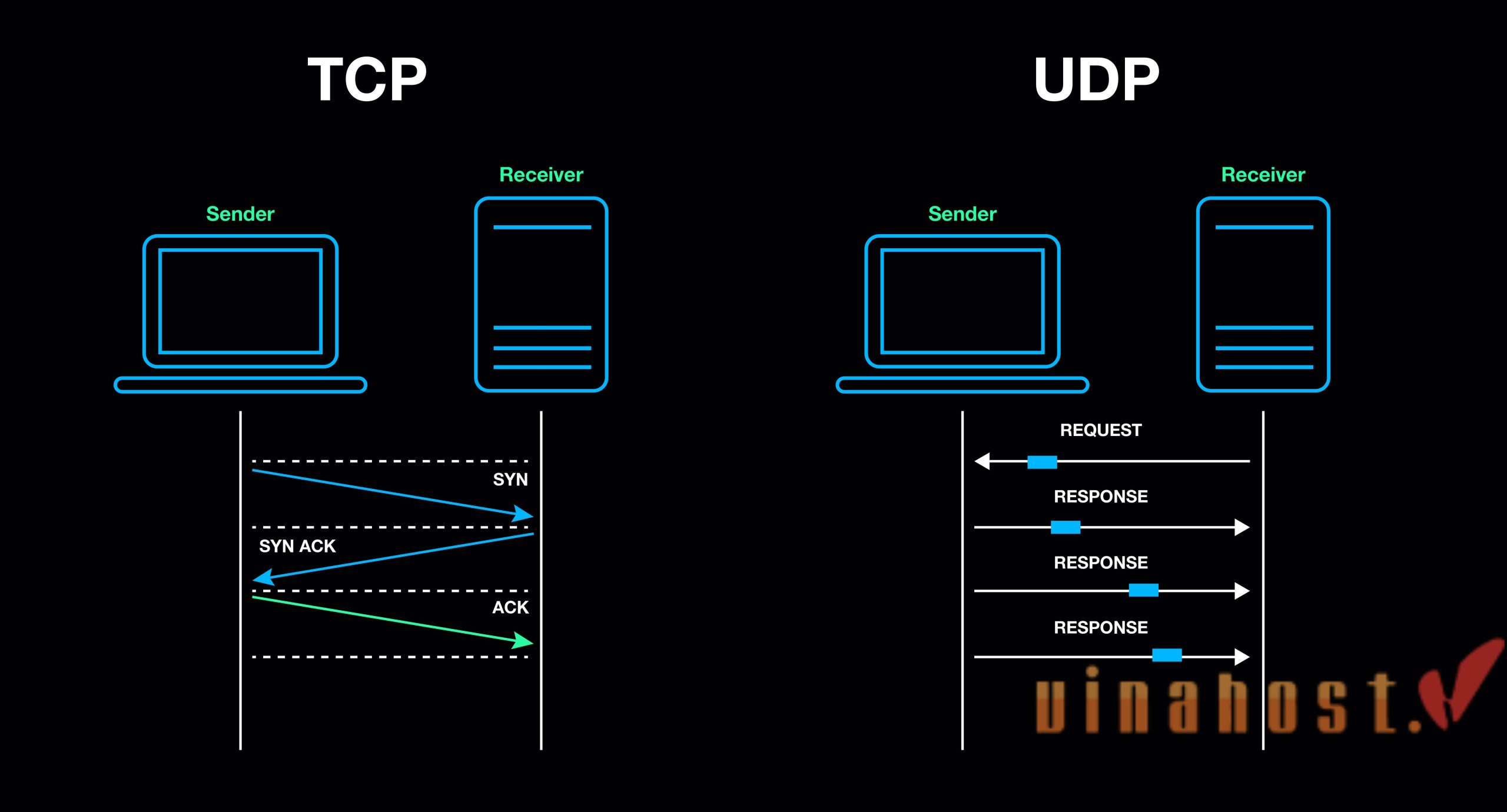
- TCP: reliable, slow
- UDP: unreliable, fast
Port Number
- Máy tính có địa chỉ ip, mỗi app chạy trên một port riêng, tưởng tượng rằng bạn đang đi lựa đồ ăn, món nhiều người ăn ở cổng 443 -> HTTPS,…
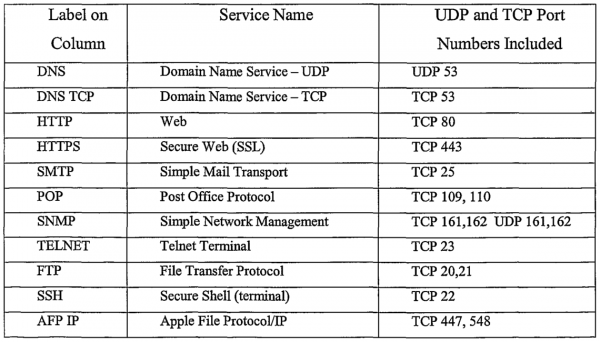
- Nhớ mấy port default này giúp ích khi setup firewalls như trong AWS Security group, Network Access Control List
- 2 máy, dịch vụ kết nối với nhau bằng địa chỉ ip + port
- 192.168.10.155:8080 (Java Spring Boot) -> 192.168.10.155:3306 (MySQL)
Container
- Trở về Linux OS Filesystem
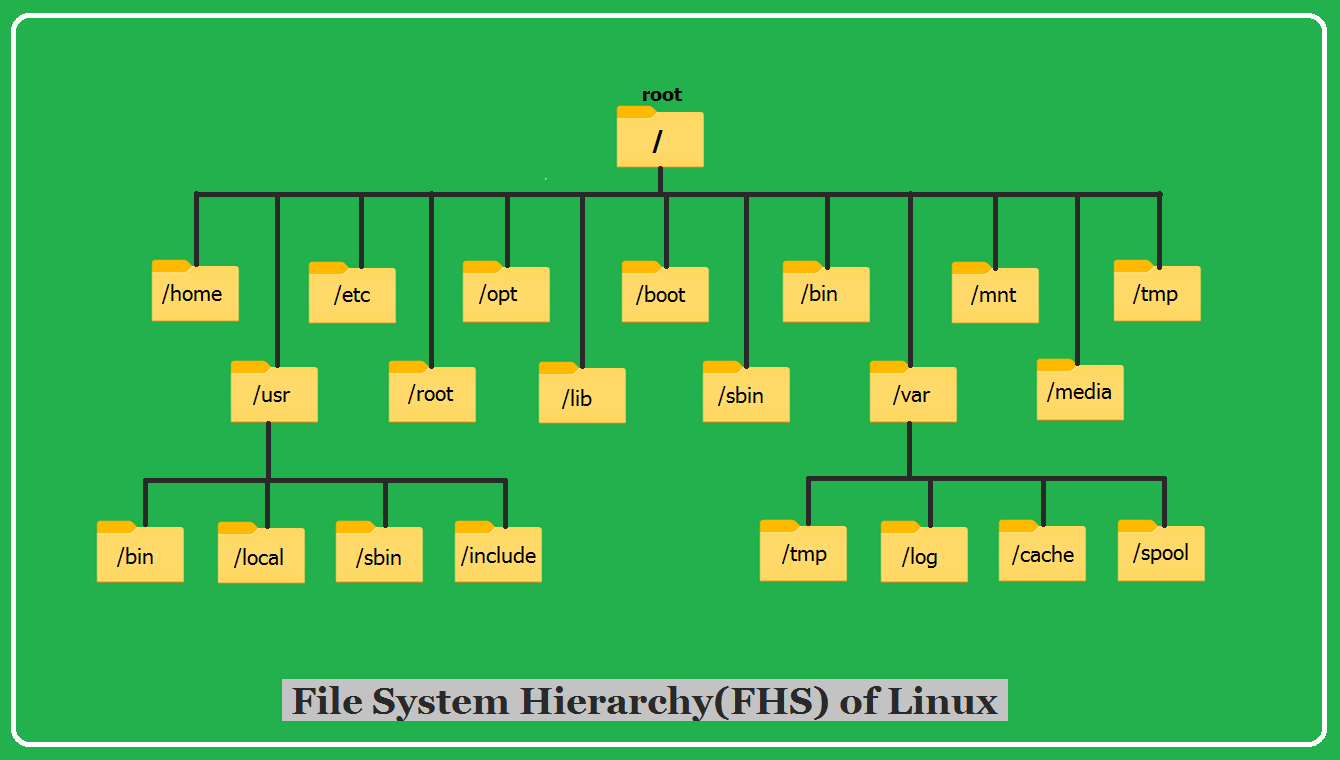
- Câu hỏi đặt ra, ai, cái gì dùng mấy các file này?
- Trả lời: các app của chúng ta dùng thường ngày (Nginx, MongoDB)
Process
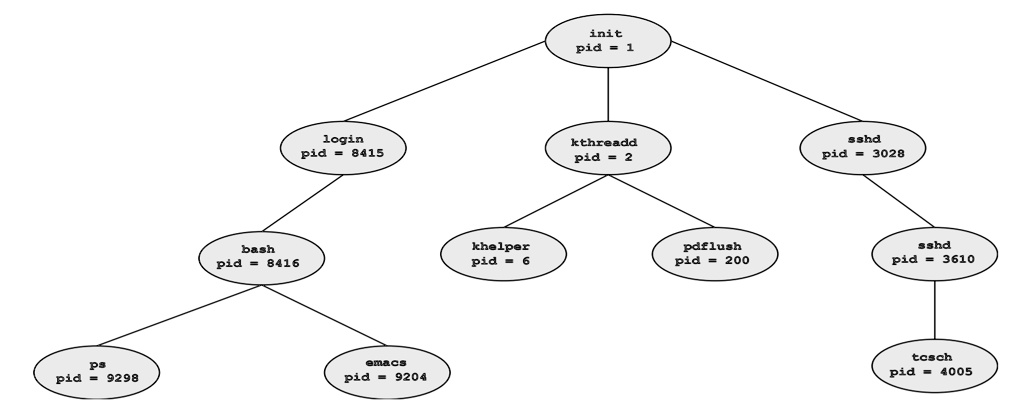
- Có nhiều process (tiến trình) trong linux
- systemd -> pid = 1, rồi được chia thành nhiều process khác -> Chạy Nginx, MongoDB, Tomcat, bla bla
-
Vấn đề đặt ra mình muốn connfig các app khác nhau thì sẽ bị ảnh hưởng lẫn nhau, tại các process (app) chạy chung trên một máy -> Isolation (độc lập) -> Tách các server riêng -> Thêm tiền
-
Giải pháp -> Container -> Một OS thu nhỏ, hay chỉ là thư mục riêng, kết nối với nhau thông qua network
- Nhỏ nhẹ, không cần chứa mọi thứ không liên quan
- pid 1 của Nginx container là Nginx (không cần systemd)
- Lưu trữ (archived), vận chuyển (shipped to production)
-
Ứng cử viên sáng giá, Docker

Docker
Docker is an open platform for developing, shipping, and running applications. Docker allows you to separate your applications from your infrastructure so you can deliver software quickly. With Docker, you can manage your infrastructure in the same ways you manage your applications. By taking advantage of Docker’s methodologies for shipping, testing, and deploying code quickly, you can significantly reduce the delay between writing code and running it in production.
- Docker Hub: where stored docker image, some other image registry on cloud providers
- GCP: Artifact Registry
- AWS: Amazon ECR (Amazon Elastic Container Registry)
- Azure: ACR (Azure Container Registry)
Bash Scripting
- Instead of doing manually command in Linux enviroment, we use text file to automate day to day regular tasks, that text file tell system run each command we defined.
- We have many cool tools outside: Ansible, Puppet, Chef, SaltStack, Terraform why to learn Bash script
Many concept derived from bash script concepts
- I write more detail about bash scripting at https://blog.lcaohoanq.works/
AWS
Git
- VSC ( Version Control)
Maven
Continuous Integration with Jenkins
- Code, Build, Test, Push
- Developer liên tục merge code vào VSC, trong số code sẽ có conflict, bugs. Sau thời gian dài, code sẽ trở nên khó quản lí, khó maintain, tăng nợ kĩ thuật (technical debt)
Integration là vấn đề rất đau đầu
- Giải pháp là CI (Continuous Integration)
CI là gì
-
Tự động hóa việc build và test code mỗi khi có thay đổi (commit) trong VSC
-
Các bước:
- Developer commit code vào VSC
- CI server (Jenkins) tự động lấy code mới nhất từ VSC
- Build code
- Test code
- Thông báo kết quả (thành công/ thất bại)
-
Mình viết riêng một bài về Jenkins CI ở đây
Python
IaC - Infrastructure as Code
IaC là gì?
Các công cụ phổ biến
- Ansible
- Terraform